Combine a preorder with an in-stock order in Shopify
Mergify is a Shopify app that lets you combine a preorder with an in-stock order from the same customer into one new order. Review the orders when every item is ready, then ship them together with one label instead of two.

Why do preorder collections lead to separate orders for one customer?
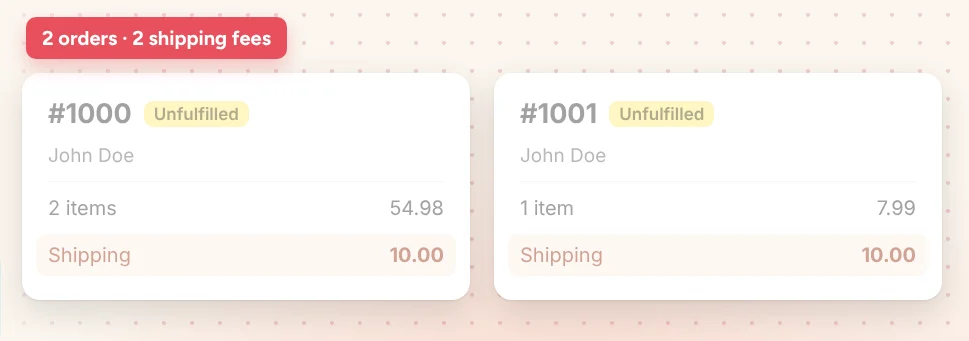
A customer can buy from a preorder collection, then return for in-stock items before the first purchase ships.
Your team now has separate orders for the same customer and address. If you hold those orders to ship together, someone must decide which purchases belong in the parcel and when everything is ready. Shopify can't merge two separate orders on its own, so the manual fix means editing or rebuilding orders (how to merge orders in Shopify). (Checked November 2026.)
For example, a customer might preorder a sweater, then buy an available scarf. Combining them can mean one packing job, but it also means waiting for the sweater. Holding orders is your store's process; Mergify combines the orders you choose.
How do I set up Mergify for preorders and hold orders?
Identify the orders you intend to ship together, use tag-based Filtering Rules, and review each group in Smart Suggest when the preorder arrives.
- Tag the orders that can't wait. Tag preorders yourself, or use your preorder app's tags if it adds them, so your team can spot them. Tag any order that must ship right away with
no-merge. - Set Smart Suggest Filtering Rules. Include unfulfilled orders with the financial status you ship, and exclude the
no-mergetag. This admits both the preorder and the in-stock order without tagging each one. An order passes when it matches every condition in one active rule, so check that no other rule lets excluded orders back in. - Review groups when the preorder arrives. Choose grouping by customer and address in Smart Suggest. Check the displayed customer, shipping address, and order count against the purchases you intend to pack. Untick an order if it should ship separately, keeping at least two selected. See the Smart Suggest review workflow for more detail.
- Choose Merge Settings before merging. Recalculate shipping from your store's own rates and decide whether to keep or refund the difference. Undo cannot reverse a shipping refund already sent. Set the originals to be fulfilled automatically when the merged order is fulfilled, copying its tracking number. Check the settings assigned to Smart Suggest, since modes can use different settings.
- Approve the group and check the result. Choose Merge to Order to combine the selected orders into one new order. Open History to review the original orders, merged order, merge date, and any shipping refunded. The originals remain in Shopify; use the new merged order for the combined shipment.
- Fulfill the combined order with tracking. Once every item is ready, pack and fulfill the merged order. With the original-order setting chosen above, the originals are fulfilled automatically and receive its tracking number.
Should I merge a preorder with an in-stock order right away?
Not always. The merged order ships when every item is ready, so the in-stock item waits for the preorder.
If that wait doesn't suit the customer, keep the orders separate and ship the available item first. If your store holds orders to ship together, review them when the preorder arrives before approving the merge.
What happens to inventory, payments, and sales reports?
Merge to Order leaves inventory with the originals and does not move their payments or charge the customer again.
Refunds stay on the original orders. Use test mode for Merge to Order to keep the merged order out of sales reports, so the purchases aren't counted as a second sale. It is still a real merge, so configured refunds and customer emails run. Review shipping and original-order settings before your first preorder merge.
This payment guidance applies to purchases already paid for. Completing a merged draft changes inventory and sales data.
How does Ruby and Roses Yarn use Mergify for preorders?
"We use this app to merge orders from large pre-order collections."
Ruby and Roses Yarn, United States, about 2 years using Mergify · January 8, 2026 · Read on the Shopify App Store
What should I check before combining preorder and in-stock orders in Shopify?
Check readiness, filter eligibility, and your shipping-refund choice before approving a combined shipment.
Can I combine a preorder with an in-stock order in Shopify?
Mergify can combine a customer's preorder and in-stock order into one new Shopify order. Choose combined shipping when the customer can wait for every item to be ready. Keep the orders separate if the in-stock items need to ship sooner.
Do both orders need the preorder tag?
No. Both orders only need to pass your Smart Suggest Filtering Rules. A rule that includes unfulfilled orders and excludes a no-merge tag admits the preorder and the in-stock order without extra tagging. A rule that admits only preorder-tagged orders would leave the in-stock order out.
Can I tell the customer their orders will ship together?
Yes. Mergify can email the customer when their orders are merged, on every plan as of November 2026. Edit the message to explain that all their items now ship together in one parcel.
Can I include a preorder placed more than 60 days ago?
Yes, if you widen Mergify's active order window, which defaults to the last 60 days. As of November 2026, you can change it in More Settings → Miscellaneous on Basic, Advanced and Professional. Check your creation-date Filtering Rules too, so the older preorder can qualify.
Can I refund the extra shipping paid on separate purchases?
Mergify can recalculate shipping from your store's own rates and refund the difference to the customer. You can choose to keep that difference instead. Undo cannot reverse a shipping refund already sent.
Does reviewing preorder groups require a paid plan?
No. As of November 2026, Smart Suggest has no viewing or use limit on any Mergify plan. Each merge you approve uses your allowance: Starter includes 5 merges in total, then $0.50 per extra merge. A merge counts once, even when it combines three or more orders.
Ready to combine shipping for your next preorder collection?
Start with the orders your team has chosen to ship together. Review each group before merging, and compare allowances on Mergify's pricing page.