Combine live sale orders in Shopify
Mergify is a Shopify app that lets you combine live sale orders from the same customer into one new order for one shipment. Review groups with Smart Suggest after the show on any plan, or use Auto Merge on Advanced and Professional with a delay counted from the customer's latest order.
Pack the viewer's purchases together with one label instead of two.

Why can one live sale viewer leave you with several orders?
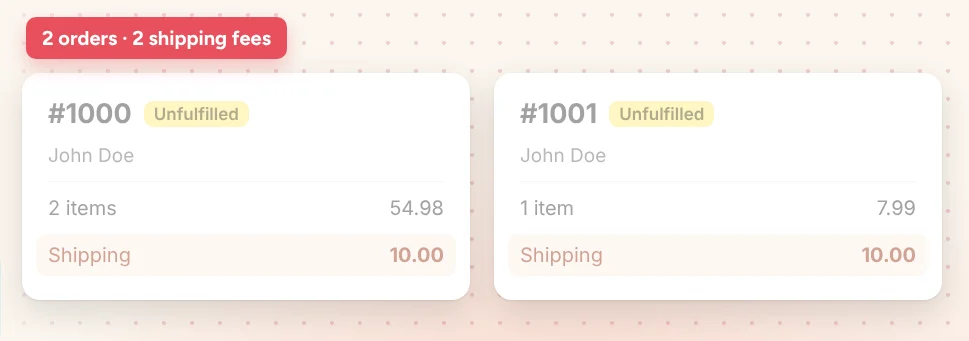
If your live-selling workflow creates a separate Shopify order for each claim, a returning viewer can leave you with several orders for one address.
A viewer might buy a shirt early in the show, then return for another item. Your team needs to decide which purchases belong together.
Check how your live-selling app creates orders before setting up merging.
How do I set up Mergify for live selling?
Identify the show's orders, define which ones can ship together, and choose a merge time that fits your packing routine.
- Check how live sale orders are tagged. Inspect the Shopify orders to see whether your live-selling app adds an order tag. Use an existing tag if it identifies the orders you need. Tag orders that must ship separately with
no-merge. - Choose a delay or a review after the show. As of November 2026, Auto Merge with a delay requires Advanced or Professional and counts from the customer's latest order. Alternatively, review groups in Smart Suggest after the show, grouping by customer and address. Smart Suggest and Auto Merge have separate Filtering Rules; check each set if you use both.
- Set Filtering Rules for that method. Use an order-tag condition to include the sale's orders, with creation date, fulfillment status, or financial status conditions as needed. For example, select unfulfilled orders from the show and exclude
no-merge. All conditions in a rule must match; any active rule can admit an order, so review the whole set. - Choose how shipping and originals are handled. In Merge Settings, recalculate shipping from your store's own rates and decide whether to keep or refund the difference. Shipping refunds already sent cannot be reversed by undo. Review shipping refunds and original-order settings before merging. You can fulfill originals automatically when the merged order is fulfilled, copying its tracking number.
- Prepare the customer email. Decide whether to notify the customer when their orders are merged. Edit the notification and use its order-detail placeholders to explain the combined order. Keep the message consistent with the shipping choice you made.
- Merge and check the result. In Smart Suggest, review the customer, address, and selected orders, then choose Merge to Order. Check Auto Merge's active order window before activation. For Auto Merge on Advanced or Professional, enable it after checking its rules and settings. Activating it can process existing eligible orders, not just the next show's. Check the resulting orders and any shipping refunded in History before packing.
What if the live-selling app combines orders itself?
If your live-selling app already combines the purchases into one order, you may not need Mergify for those orders.
Mergify can still combine that customer's separate Shopify orders, such as a live sale order and an online-store order. Check that both orders belong in the same shipment and have the same customer and shipping address.
Make sure your filters admit both orders. A rule limited to the live sale tag leaves an untagged online-store order out. To include both, consider unfulfilled orders and exclude no-merge instead, then review the group in Smart Suggest.
What happens to the original orders and sales records?
Mergify creates a new order and keeps the originals in Shopify. For purchases already paid for, use Merge to Order.
Merge to Order leaves inventory with the originals and does not move their payments or charge the customer again. Use test mode for Merge to Order to keep the merged order out of sales reports. It is still a real merge, so configured refunds and customer emails run.
Completing a merged draft changes inventory and sales data; the Merge to Order reporting treatment does not apply.
What should I check before I combine live sale orders in Shopify?
Check which orders qualify, when you want them merged, and how you will handle shipping charges and customer communication.
Can I combine live sale orders in Shopify after the show?
You can use Mergify's Smart Suggest to review groups after a live sale and approve the orders you want to combine. Each suggestion shows the customer, shipping address, and number of orders. Your store decides when to start packing.
What happens to the delay when a viewer places another order?
The delay starts again. Mergify's Auto Merge delay counts from the customer's latest order, so each new order from that viewer resets it. As of November 2026, this mode requires Advanced or Professional.
How do I keep a live sale order out of automatic merging?
Tag the order with an exclusion such as no-merge, then exclude that tag in Mergify's Auto Merge Filtering Rules. Smart Suggest has separate rules if you also use it for review.
Will customers get an email about their combined live sale orders?
Mergify can send a customer email when their orders are merged. You can edit the message and use placeholders for order details. As of November 2026, customer notification is included on every plan.
Which plan do I need to combine orders from live shopping?
As of November 2026, every Mergify plan includes unlimited Smart Suggest. Auto Merge needs Advanced ($29.99/month, 150 merges/month) or Professional ($49.99/month, 350 merges/month). A merge counts once, even when it combines several orders from one viewer.
What if a viewer hasn't paid yet?
Add a financial-status condition to your Filtering Rules so only orders with the status you ship qualify. Unpaid claims stay out until their status matches.
Can I undo a live sale merge if I picked the wrong orders?
Mergify's History lets you undo a merge by deleting the merged order; the original orders remain in Shopify. Undo cannot reverse shipping refunds already sent or cancellations of original orders. Review the selected orders and refund choice before merging.
Ready to set up combined shipping before your next live sale?
Choose your order tags, review the shipping policy, and decide when your team will pack. Compare Mergify plans and merge allowances to choose between reviewing groups yourself and automatic merging.