Combine repeat Shopify orders during Black Friday
Mergify is a Shopify app that combines eligible Black Friday orders into one new order, so you can pack one box with one label. Review each group in Smart Suggest on any plan, or use Auto Merge on Advanced and Professional. Merge before separate fulfillment begins; the original orders stay in Shopify.
Black Friday is November 27, 2026; Cyber Monday is November 30. Check your workflow before the sale.

Why do customers order twice during a sale?
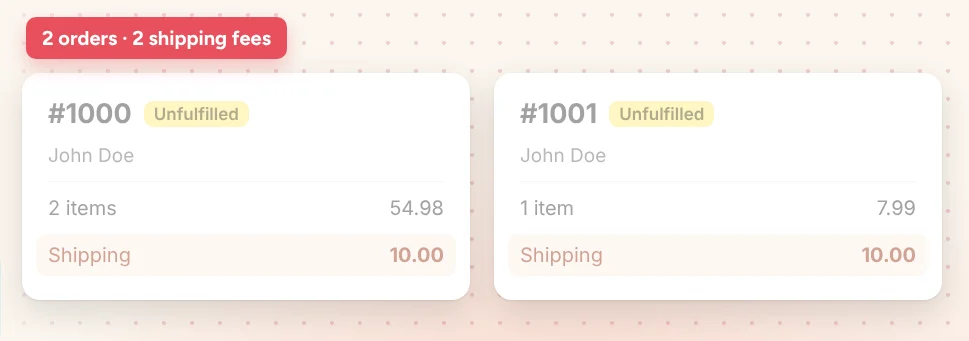
A shopper may buy a popular size, then return for a matching item. Product drops and gifts can also create repeat orders before shipping. Without a merge, that can mean two picks, two boxes and two labels for one address.
Before picking starts, check what belongs together and keep separate gifts out of the group.
How do I set up Mergify to combine Black Friday orders?
Keep Auto Merge off while you configure and check these five steps. Activating it can process existing eligible orders.
- Set Filtering Rules first. Include the orders you intend to combine, such as paid, unfulfilled purchases. Exclude orders tagged
no-merge, and check the rules for each merge mode. - Choose grouping and timing. Smart Suggest groups by shipping address only, or by customer and address; you approve each group. For automation on Advanced or Professional, choose a delay from the first matching order or a daily run in your store timezone. Later matching orders do not restart the delay. Plan warehouse timing too: merge before staff start picking the separate orders.
- Review Merge Settings. Choose the shipping calculation, refund policy, customer notification email and original-order actions for your merge mode. Tag or archive originals as needed, and decide when they become fulfilled. Leave cancellation off.
- Use test mode for Merge to Order. It keeps the merged order out of sales reports. This is still a real merge: configured refunds, order actions and notifications can run.
- Try one controlled Manual Merge. Use two orders you place yourself and keep Auto Merge off. Inspect History, both originals and the combined order, then check that your shipping system will process only the intended shipment. Verify Auto Merge's own settings before activating it.
Follow the Shopify order-merging steps, or see how to merge before batch fulfillment if your team uses Shopify batches.
Should I refund the extra shipping when I combine orders?
Choose the option that matches your published shipping policy. Mergify can recalculate shipping from your store's rates, then keep or refund the difference.
If you refund, the customer sees a shipping refund on the original order. If you keep it, what they paid doesn't change. Check the calculation before enabling refunds.
Automatic shipping refunds are off by default. Once sent, a refund is irreversible, including through Undo; check the actual payment record to confirm it completed. On every plan, Mergify can send a customer notification email when orders are merged.
Which Mergify plan do I need for peak season?
Choose any plan for Manual Merge and unlimited Smart Suggest, or Advanced or Professional for Auto Merge. As of November 2026, Starter includes five merges in total, then costs $0.50 per additional merge.
Basic is $9.99/month with 35 included merges, Advanced is $29.99 with 150, and Professional is $49.99 with 350. Afterward, each extra merge costs $0.30, $0.20 or $0.15 respectively.
Paid plans have a 7-day trial; additional usage above the allowance is charged during the trial too. Use Mergify pricing to choose a plan for your expected merges.
What does a preorder merchant say about Mergify?
"We use this app to merge orders from large pre-order collections."
Ruby and Roses Yarn, United States, about 2 years using Mergify · January 8, 2026 · Read on the Shopify App Store
What do merchants ask about combining Black Friday orders on Shopify?
Can I combine orders placed on different days of a sale?
Yes, if the orders are eligible and have not entered separate fulfillment. Mergify's Filtering Rules can use creation date, fulfillment status and payment status to select orders. Check the destination and items before combining purchases from different sale days.
Can Mergify combine Black Friday orders automatically?
Yes, with Auto Merge on Advanced or Professional. A delay starts from the first matching order; later matching orders do not restart it. Other options are instant merging and daily or weekly runs in your store timezone.
Can I exclude preorders or gift orders from a merge?
Yes. Tag an order that should ship separately, such as a gift or preorder, with no-merge and exclude that tag in Filtering Rules. Check the rules for Smart Suggest and Auto Merge separately.
Does combining sale orders affect inventory or customer payments?
Standard Merge to Order leaves inventory with the originals and does not move their payments or charge the customer again. Test mode keeps the merged order out of sales reports. Completing a merged draft changes inventory and sales data, so use a draft only when you need to edit before creating the final order.
How are merges counted when a customer orders three times?
Three original orders combined into one result use one included merge. After the allowance, each extra merge costs $0.30 on Basic, $0.20 on Advanced or $0.15 on Professional, as of November 2026. Starter instead charges $0.50 per additional merge after its five total included merges. Creating a merged draft also counts as a merge.
Can I undo a Black Friday merge?
Yes. Undo in Mergify History deletes the merged order; the originals remain in Shopify. It cannot reverse a shipping refund already sent or the cancellation of an original order. Check fulfillment and refund records before deciding what should ship next.
What if my 3PL already imported the original orders?
With Mergify's ShipStation or ShipBob integration connected, merging cancels the originals in that service so only the merged order is fulfilled. The original orders stay in Shopify. For other 3PLs, check how they handle imported, archived and fulfilled orders. Verify the shipment tasks with a controlled merge before the sale.
Ready to check your merge workflow before Black Friday?
Before November 27, check your rules, refund policy and one controlled merge with your packing team.